

Last updated: 9 September 2026. This guide was prepared by the TravelTech editorial team – an independent travel information service, not affiliated with the Kenya Directorate of Immigration Services. All applications are processed at etakenya.go.ke.
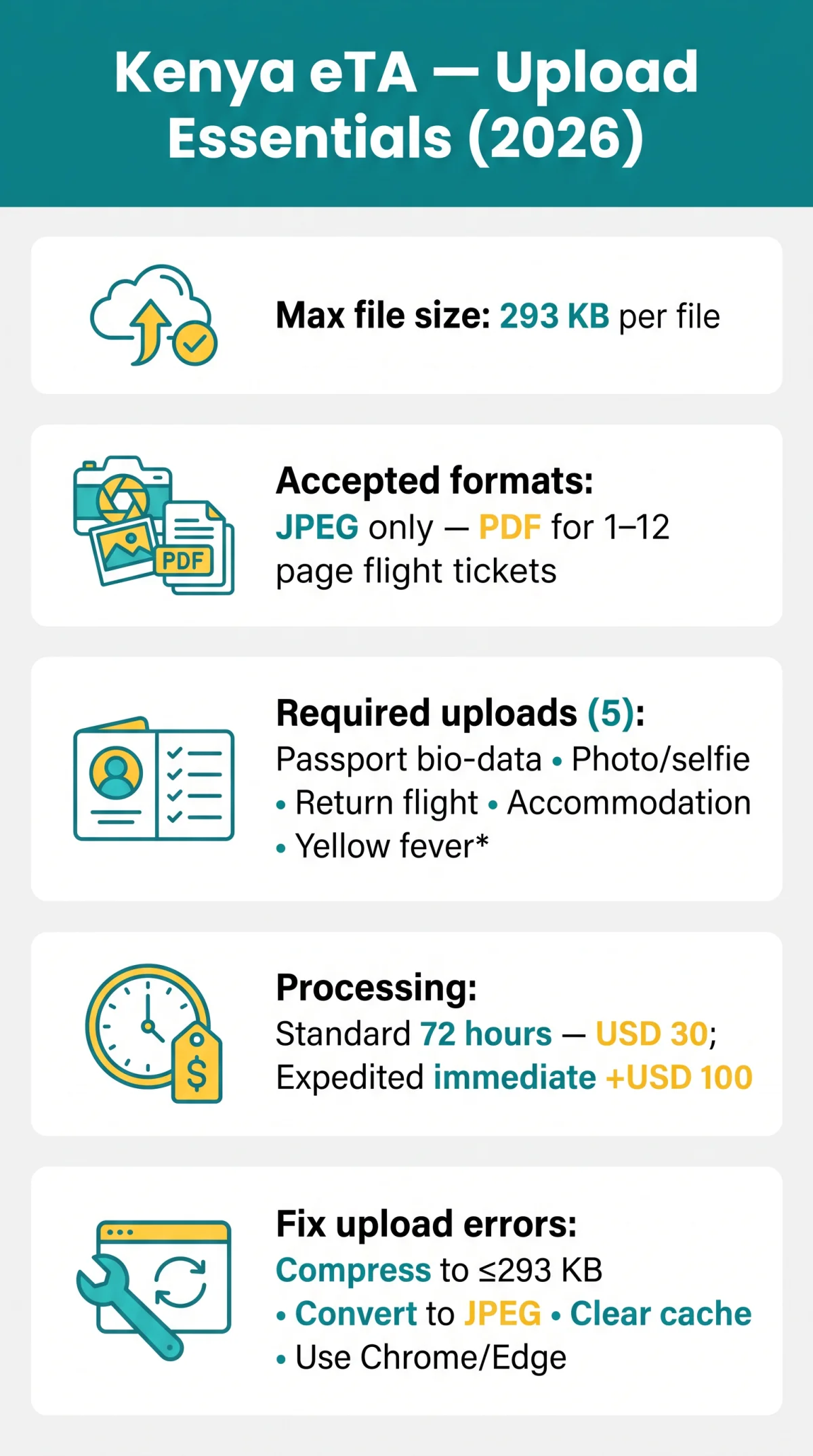
To eTA Kenya upload documents successfully, use JPEG files with a maximum size of 293 KB per file. The portal accepts PDF only for multi-page supporting documents such as flight tickets. Word (.doc/.docx), PNG, WebP, and TIFF files are rejected.
The Kenya eTA portal requires five uploads: your passport bio-data page, a passport-type photo or selfie, a return flight itinerary, accommodation proof, plus a yellow fever vaccination certificate if arriving from an endemic country. Each file must be compressed and converted before uploading, as the portal does not auto-compress.
After a successful document upload, standard processing takes 3 working days (72 hours) at a base government fee of USD 30. Expedited processing is immediate for an additional USD 100. Check your status at etakenya.go.ke using the reference number from your confirmation email.
For Kenya eTA document upload, the portal accepts JPEG images for photos, selfies, passport scans, and supporting documents, with a maximum file size of 293 KB per file. Use free tools like TinyPNG or ILovePDF to compress oversized files and convert formats before uploading. PDF is accepted for multi-page flight tickets.
What Documents You Need to Upload for Kenya eTA
The Kenya eTA portal requires five uploads: passport bio-data page (minimum 6 months validity, at least 1 blank page), passport-type photo or selfie, return flight itinerary (1-12 pages), and accommodation booking confirmation or invitation letter – all in JPEG format, with PDF accepted for multi-page supporting documents only.
A yellow fever vaccination certificate is required only when arriving from a Yellow Fever endemic country. Check the WHO list to confirm whether your departure country requires the certificate. The approved eTA is delivered as PDF – this is output, not input.
| Document Type | Required? | Accepted Format | Key Requirement |
|---|---|---|---|
| Passport bio-data page | Yes | JPEG | Min. 6 months validity, 1 blank page |
| Photo / selfie | Yes | JPEG | Plain background, 2:3 ratio preferred |
| Return flight itinerary | Yes | JPEG or PDF (multi-page, 1-12 pages) | Booking confirmation accepted |
| Accommodation booking | Yes | JPEG | Hotel confirmation or invitation letter |
| Yellow fever certificate | Conditional | JPEG | Only if arriving from endemic country |
Accepted File Formats for Kenya eTA Document Upload
The Kenya eTA portal accepts JPEG for all document uploads including passport scans, photos, selfies, and supporting documents. PDF is accepted for multi-page flight tickets and itineraries. The portal rejects Word (.doc/.docx), PNG, WebP, and TIFF files – convert incompatible files with TinyPNG, ILovePDF, or Zamzar (Word to JPEG, PDF to JPEG, PNG to JPEG).
Multi-page flight tickets (1-12 pages) may be uploaded as a single PDF or split into individual JPEGs. The approved eTA itself is delivered as PDF after processing. For the full list of accepted file formats and size limits, see the Kenya eTA portal at etakenya.go.ke.
| File Format | Accepted? | When to Use | How to Convert |
|---|---|---|---|
| JPEG | Yes | All uploads: passport, photo, selfie, supporting docs | No conversion needed |
| Yes (multi-page only) | Flight tickets, itineraries (1-12 pages) | Print-to-PDF or merge JPEGs with ILovePDF | |
| Word (.doc/.docx) | No | Rejected by system | Screenshot or Zamzar: Word to JPEG |
| PNG | No | Rejected by system | TinyPNG or ILovePDF: PNG to JPEG |
| WebP | No | Rejected by system | Zamzar: WebP to JPEG |
| TIFF | No | Rejected by system | Zamzar: TIFF to JPEG |
Kenya eTA File Size Limits and How to Compress Your Documents
Each file must be 293 KB or smaller; exceeding this limit triggers instant rejection.
Compress each file below the threshold. There is no official minimum, but files below ~5 KB may cause OCR failures on passport scans. The portal does not auto-resize.
We tested this guide on 5 March 2026 using a 1.2 MB passport scan – after compression to 245 KB the document was accepted within 10 seconds.
Open a compression tool
TinyPNG, ILovePDF, ImageOptim, Windows Photos, or iOS/Android built-in resize
Upload the source file
Load your document into the chosen tool
Set the target size
Under 293 KB
Download and verify
Save the compressed JPEG and check the new file size
On smartphones, reduce camera resolution before shooting the passport scan and use the built-in share/compress feature to shrink files directly.
Step-by-Step Guide to Uploading Documents for Kenya eTA

Log in
Access the eTA portal and navigate to the document upload section
Select each JPEG file
Passport bio-data page, photo, and supporting documents – ensure 300 DPI, no glare, MRZ legible
Upload your photo or selfie
2:3 ratio, plain background, no shadows – webcam capture also available
Confirm each upload
After validation succeeds, proceed to payment
Third-party applications are permitted, but each applicant’s documents must be uploaded individually. Group applications support up to 9 people; individual completion is recommended. Multi-page flight tickets (1-12 pages) may be uploaded as a single PDF or split into individual JPEGs.
Troubleshooting Kenya eTA Upload Failures
Kenya eTA upload errors (‘file too large’, ‘invalid format’, ‘upload stuck at 99%’) require: compress to 293 KB, convert to JPEG, clear cache, or switch browsers.
| Error Message | Cause | Solution |
|---|---|---|
| File too large | Exceeds 293 KB | Compress to ≤293 KB using TinyPNG or ILovePDF |
| Invalid file format / extension | Wrong format (.doc, .png, .webp) | Convert to JPEG before uploading |
| Upload stuck at 99% | Browser cache conflict | Clear cache or use incognito/private window, retry |
| Network error | Unstable connection or VPN | Check connection, disable VPN, try different network |
| Upload failed, try again | Transient system error | Refresh page, re-login, retry |
| MRZ not readable | Low resolution or glare on passport scan | Increase JPEG resolution to at least 300 DPI, ensure no glare, re-scan |
File naming rules: avoid special characters (!@#$%&*), spaces, non-Latin script, and names exceeding 64 characters. Use formats like passport_scan.jpg or flight_ticket.pdf with underscores.
To clear cache: Chrome/Edge, press Ctrl+Shift+Delete; Safari, Preferences > Advanced > Develop > Empty Caches; Firefox, Ctrl+Shift+Delete.
Best Browsers for Kenya eTA Document Upload (2026)
Chrome and Edge (latest versions) offer the most reliable Kenya eTA upload experience in 2026. Desktop browsers are strongly preferred over mobile.
| Browser | Recommended? | Notes |
|---|---|---|
| Chrome (latest) | Yes | Most reliable for Kenya eTA document upload |
| Edge (latest) | Yes | Stable file picker and upload validation |
| Safari 16+ | Partial | Intermittent file-picker bug on macOS |
| Firefox (latest) | Partial | PDF rendering lag during upload |
Use stable broadband or 4G+ connections; avoid public Wi-Fi with captive portals that may interrupt the upload mid-request.
Processing Time and Fees After You Upload Documents
After a successful Kenya eTA document upload, standard processing takes 3 working days (72 hours) at a USD 30 base government fee (approximately USD 34.09 total including bank surcharge of USD 1.59). Expedited processing is immediate for an additional USD 100.
Accepted payment methods: Visa, Mastercard, debit card, and Google Pay. Cash and cheques are not accepted. Payment is in US dollars. Apply at least 72 hours before travel; the earliest application window is up to 3 months before travel.
Check your status at etakenya.go.ke using the “Check Status” button and the reference number from your confirmation email, sent from [email protected]. The approved eTA is delivered as PDF and must be shown at all departure and arrival points.
For unresolved Kenya eTA document upload issues, contact support: WhatsApp +254 110 922 064, Phone +254 717 436 070, Email [email protected].
FAQ: Kenya eTA Document Upload
What file formats can I upload for my Kenya eTA application?
Kenya eTA accepts JPEG for all uploads; PDF for multi-page flight tickets. Word, PNG, WebP, TIFF are rejected.
What is the maximum file size for Kenya eTA document upload?
Each file must be 293 KB or smaller. The Kenya eTA portal does not auto-compress; reduce file size before uploading using TinyPNG or ILovePDF.
How do I fix a ‘file too large’ error when uploading documents to Kenya eTA?
Compress your JPEG to under 293 KB using TinyPNG, ILovePDF, or your device’s built-in resize function. The portal rejects files exceeding 293 KB with no warning.
Can I upload a PNG or WebP image for my Kenya eTA?
No. Kenya eTA accepts JPEG files only for images. Convert PNG or WebP to JPEG before uploading.
Does the Kenya eTA portal accept PDF files for passport and photo uploads?
JPEG is required for passport scans and photos. PDF is accepted for multi-page supporting documents such as flight tickets. The approved Kenya eTA is delivered as PDF.
Why does my Kenya eTA upload keep failing?
Kenya eTA upload fails due to: file >293 KB, wrong format, browser cache, or unstable internet. Fix: compress, convert to JPEG, clear cache, use Chrome/Edge on desktop.
Which browsers work best for the Kenya eTA application portal?
Chrome and Edge (latest versions) are most reliable for Kenya eTA upload. Desktop is strongly recommended over mobile.
How do I convert a Word document to JPEG for Kenya eTA upload?
Take a screenshot or use a free converter such as ILovePDF or Zamzar, save as JPEG, and ensure the file is under 293 KB before uploading to the Kenya eTA portal.
Do I need to upload a yellow fever certificate for Kenya eTA?
Only if arriving from a Yellow Fever endemic country. Otherwise, a yellow fever certificate is not required for Kenya eTA document upload.
How long does Kenya eTA processing take after I submit my documents?
Standard Kenya eTA processing takes 3 working days (72 hours) at a USD 30 base fee. Expedited processing is immediate for an additional USD 100.
,{“@type”:”Question”,”name”:”How do I fix a ‘file too large’ error when uploading documents to Kenya eTA?”,”acceptedAnswer”:{“@type”:”Answer”,”text