
Last updated: September 2026. This is an independent informational guide for tourists. The eTA Kenya portal is operated by the Government of Kenya at etakenya.go.ke; this website is not affiliated with the Kenyan government.
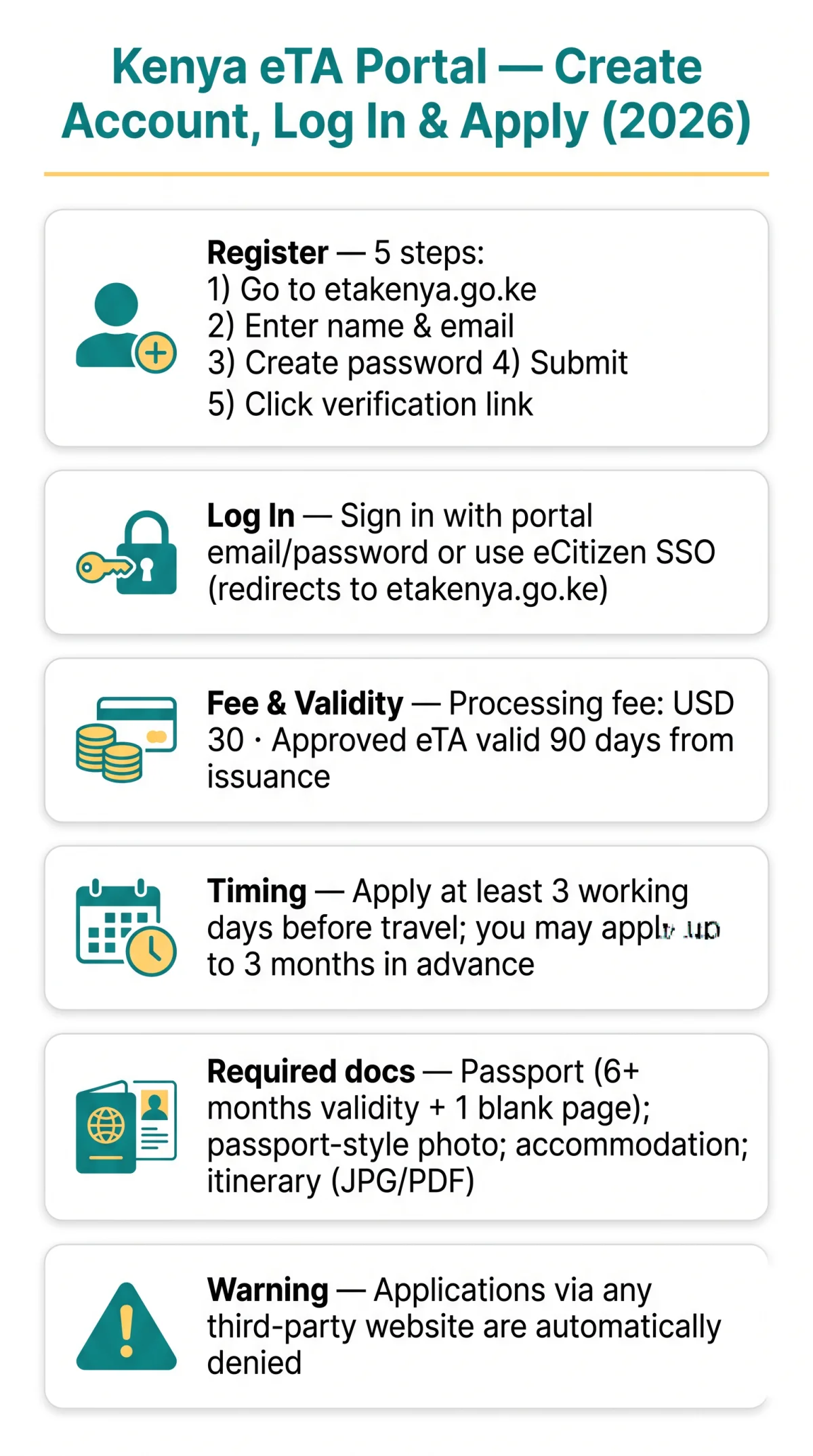
The eTA Kenya portal at etakenya.go.ke is the sole online gateway for obtaining Electronic Travel Authorisation before travelling to Kenya. All visitors, including infants, must apply through this platform, which replaced the former eVisa system on 5 January 2024, per Kenya Gazette Supplement No. 1 of 2 January 2024. Applications submitted through third-party websites are automatically denied, and the traveller will not be allowed to travel.
What Is the Kenya eTA Portal and How to Access It
The Kenya eTA portal, operated by the Directorate of Immigration Services under the Ministry of Interior and National Administration, requires all visitors including infants and children to obtain travel authorisation online before departure. Applications submitted through third-party websites are automatically denied.
The Kenya eTA application portal at etakenya.go.ke replaced the former eVisa system at evisa.go.ke on 5 January 2024, per Kenya Gazette Supplement No. 1 of 2 January 2024.
- All visitors must apply, including infants and children (a parent, legal guardian, or accompanying adult must submit on their behalf)
- Exempt categories: EAC citizens (up to 180 days), nationals of 90-day exempt countries (e.g. Zimbabwe), nationals of 60-day exempt African countries (e.g. Tunisia), transit passengers, crew members, work permit holders
- Third-party warning: Applications through any site other than the government platform at etakenya.go.ke are automatically denied
- Validity: Approved eTAs are valid for 90 days from the date of issuance; the duration of stay is determined at the point of entry upon arrival in Kenya
How to Create an Account on the Kenya eTA Portal
The Kenya eTA portal requires every traveller to register a personal account before starting a new Electronic Travel Authorisation application. To begin, visit etakenya.go.ke and click the Sign Up button to access the registration form.
Step-by-Step Registration Process
Go to etakenya.go.ke and click Sign Up
Access the portal to begin the registration process.
Enter your first name and surname
Fill in the registration form with your details.
Provide a valid email address and create a password
Ensure the password meets the Kenya eTA portal’s complexity requirements.
Submit the form
This triggers the system to send a verification email containing an activation link.
Open the email and click the activation link
Confirm your account to complete the process.
Email Verification and Account Activation
After submitting the form, the Kenya eTA portal sends a verification email with an activation link to the address you provided. If the email does not arrive within a few minutes, check your spam or junk folder first. If the original link has expired, you can request a new verification link directly from the portal.
How to Log In to the eTA Kenya Portal (Including eCitizen Integration)
Returning users sign in at etakenya.go.ke with their registered email and password; existing eCitizen account holders authenticate via eCitizen SSO and are automatically redirected to the eTA dashboard.
The eTA Kenya portal operates as a standalone web application, not an internal eCitizen sub-module. New users register directly on the portal at etakenya.go.ke using a personal email address and password. Returning users enter the same credentials on the Sign In page to access the dashboard.
Travellers with an existing eCitizen account can also reach the eTA platform through the eCitizen gateway at immigration.ecitizen.go.ke, which displays the breadcrumb path Home/ETA and redirects to etakenya.go.ke. The eCitizen platform, labelled “Gateway to All Government Services,” offers both Sign In and Sign Up authentication options. Once authenticated, eCitizen SSO routes the user to the standalone Kenya eTA portal dashboard automatically.
Navigating the Dashboard and Completing Your Application
The Kenya eTA portal dashboard displays main menu options (New Application, My Applications, Validate eTA), allowing users to start, resume, or verify applications from a single interface.

| Menu Item | Function |
|---|---|
| New Application | Start a fresh eTA request |
| My Applications | View or resume pending applications |
| Validate eTA | Verify an approved eTA using your reference number, passport number, and date of birth |
| Contact Us | Access support channels |
The Kenya eTA portal charges a processing fee of USD 30, payable online by credit card or debit card. Cheques and cash are not accepted. Required documents include a passport with at least 6 months validity beyond your planned arrival date and 1 blank page, a selfie or passport-type photo, accommodation booking confirmation, and arrival/departure itinerary. Files must meet portal size limits and be in JPG or PDF format.
Standard processing takes within 3 working days but may take longer in some cases. If payment is declined, wait a few minutes and retry, ensuring sufficient funds are available on your payment method. A denied eTA means the traveller will not be allowed to travel to Kenya.
Troubleshooting Login Issues on the eTA Kenya Portal
The Kenya eTA portal is optimised for Google Chrome, Safari, and Microsoft Edge; disable ad-blockers and browser translation extensions to avoid form-rendering errors.
| Problem | Possible Cause | Solution |
|---|---|---|
| OTP not received | International carrier routing or spam filter | Wait several minutes, check spam folder, then contact [email protected] or call +254 717 436 070 |
| Session timeout / data loss | Inactivity period exceeded | Save application progress frequently to prevent losing entered data |
| CAPTCHA errors / submission blocked | Cached cookies or ad-blocker interference | Clear browser cache and cookies, disable ad-blockers, or switch to a different network |
| Browser compatibility issues | Unsupported browser or active translation extension | Use Chrome, Safari, or Edge; disable translation add-ons |
| Password not working | Forgotten or mistyped credentials | Click “Forgot Password,” enter your registered email, and follow the reset link; if the link does not arrive, check spam or contact support |
For escalation beyond portal-level support, the Directorate of Immigration Services can be reached at [email protected], by WhatsApp at +254 110 922 064, or by phone at +254 110-922062, +254 110-922063, or +254 110-922064. The Directorate’s switchboard is +254 20 2222022, and the physical office is at
Nyayo House, Ground floor, Nairobi, Kenya.
Contacting eTA Portal Support for Escalation
The Kenya eTA portal provides multiple support channels: portal-domain contacts for technical issues and Directorate-level contacts for departmental escalation.
- Portal support (technical issues): email [email protected], phone +254 717 436 070, WhatsApp +254 110 922 064.
- Directorate escalation (departmental matters): email [email protected], phones +254 110-922062, +254 110-922063, +254 110-922064, switchboard +254 20 2222022.
FAQ
How far in advance should I apply for my Kenya eTA?
Apply at least 3 working days before travel, but you can submit up to 3 months in advance. Processing typically takes within 3 working days but may take longer in some cases.
Do I need to print my eTA approval?
Travellers should carry a printed or digital copy of their approved eTA. The duration of stay is determined at the point of entry upon arrival in Kenya.
How much does the Kenya eTA cost from the UK?
The eTA processing fee is USD 30, payable online by credit card, debit card, or other accepted electronic means. Cheques and cash are not accepted. If your payment is declined, wait a few minutes, ensure sufficient funds, and try again.
Can I use my existing eCitizen account for the eTA portal?
Yes. Existing eCitizen users authenticate via eCitizen SSO at immigration.ecitizen.go.ke and are automatically redirected to etakenya.go.ke to complete the eTA application. The eTA system operates as an independent web application, not an internal eCitizen sub-module.
What if my verification email doesn’t arrive?
Check your spam or junk folder first. If the email is not there, request a new verification link from the Kenya eTA portal login page. Links may expire after a set period, so you might need to generate a new one to activate your account.
What documents do I need to upload for the eTA application?
A passport valid for at least 6 months with one blank page, a selfie or passport-type photo, accommodation booking confirmation, and arrival/departure itinerary in JPG or PDF format. Files must meet portal size limits.
Can I apply for my children or family members?
Yes. Parents or legal guardians must submit applications for minors under 18. Families are recommended to apply as a group on the eTA Kenya portal. All visitors, including infants and children, must obtain travel authorisation before departure.
Why does the portal keep logging me out?
The Kenya eTA portal automatically ends sessions after inactivity. Save your progress frequently. If the issue persists, clear your browser cache and cookies or switch to Google Chrome or Safari. Disabling ad-blockers can also resolve session and form-rendering errors.